Digital Fridge Calendar
A communal digital calendar to hang on my fridge
I wanted everyone in my household to be able to see each other's schedules in one place. This need led me to build a digital calendar that can be displayed on the fridge, allowing us to check each other’s schedule at a glance. In this article I will walk through the design choices and the build process of creating this digital fridge calendar.
Here were some basic requirements for my digital calendar:
- Must be able to display events from multiple Google calendars
- Must be able to display events for the upcoming week
- Events must stay reasonably up to date - daily refresh at night is good enough for our needs
- Must be wireless - it was not easy to reach an electrical outlet from the fridge in our house. Additionally, the thought of having a wire dangling from the fridge door annoyed me
Hardware
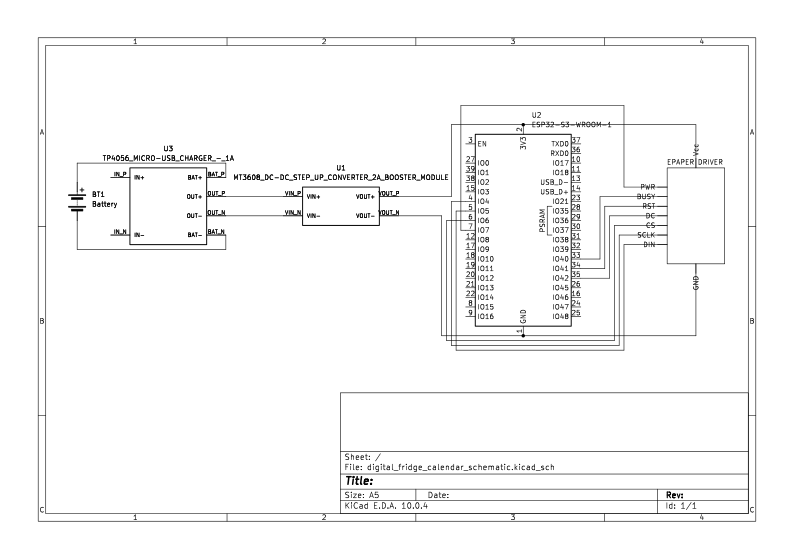
The main requirement driving the majority of hardware decisions is needing the fridge calendar to be wireless. If the fridge calendar is not getting its power from an outlet, it must be battery powered. This pretty much determined the parts list for the fridge calendar:
- ePaper Screen + Driver - Regular LED screens need a continuous power supply to keep the screen on. On the other hand, e-Paper screens only consume battery when the screen image is changing. Otherwise, the screen still retains its image even if it is disconnected from battery
- ESP32-S3-N16R8 Microcontroller - A microcontroller that can be battery powered while still having WiFi functionality to get Google calendar events and additional PSRAM to store the data needed to display on the screen
- 18650 Li-ion Battery - This is a good battery choice for the ESP32-S3-N16R8 Microcontroller. The onboard wifi module on the microcontroller causes a sudden surge in current needed to produce and broadcast the wifi signal. This battery is low enough in voltage to not fry the chip (which operates at 3.3V) and a high enough current to handle the current spike caused by the wifi module.
- TP4056 Charging and Dual Protection Module - Li-on batteries get damaged if its voltage gets too high or too low. This circuit is necessary to ensure safe operation of the battery. It can also be used to charge the battery when it runs out.
- MT3608 Boost Converter - According to multiple sources, using the 3.3V pin on the ESP32-S3-N16R8 Microcontroller results in insufficient current, especially when the onboard Wifi module is used. Therefore, I had to see a boost converter to boost the voltage from 3.6 to 5V so I can use the 5V pin on the microcontroller
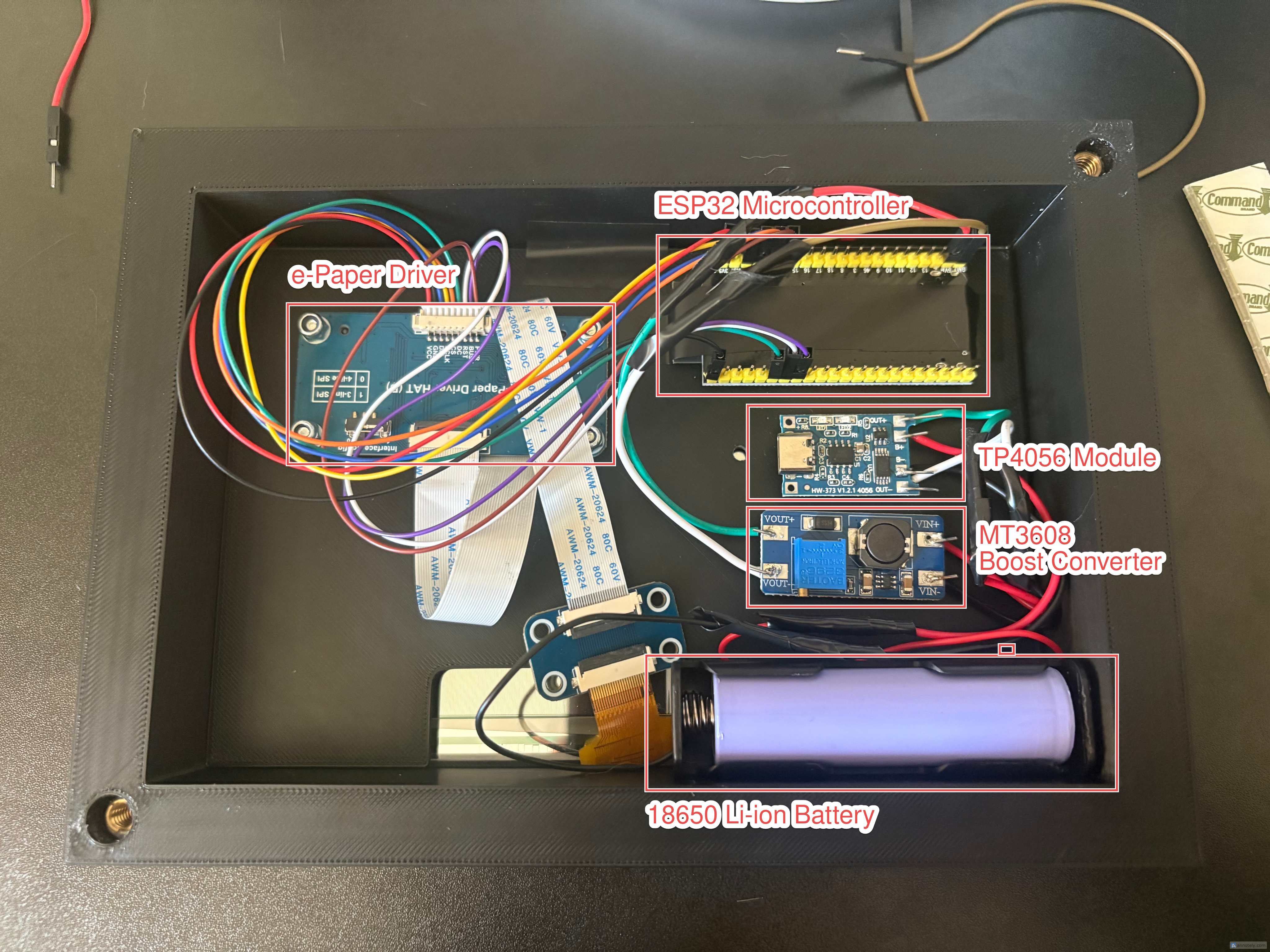
This is what the circuitry looks like after it has been installed in the case.
Software

On startup, the ESP32 microcontroller executes the following steps - the whole logic is coded up in the ESP32.ino file:
- On startup and at the 0th hour of the local timezone, the ESP32 microcontroller powering the Fridge Calendar makes a call to the Google Calendar Python Server asking for events happening in the next week
- Google Calendar Python receives the call, authenticates using Google Service Account credentials, and gets the calendar events from the Google Calendar API.
- The Google Calendar Python Server sends the calendar events back to the Fridge Calendar's ESP32 microcontroller.
- The Fridge Calendar's ESP32 microcontroller takes the Google Calendar data and display it on its screen.
- The ESP32 microcontroller will then go to sleep and awake at midnight the next day to refresh the calendar.
Ideally we would have the ESP32 microcontroller authenticate to Google API directly. However, it does not have the sufficient RAM to authenticate and gain access to the Google calendar. This would have been possible if our Google calendars were public and authentication was not needed, but we weren’t willing to make our calendars public for this. Since I had a homelab, it made sense to host a small Flask server that had the resources to authenticate in the Google API and get the events.
Finished Project
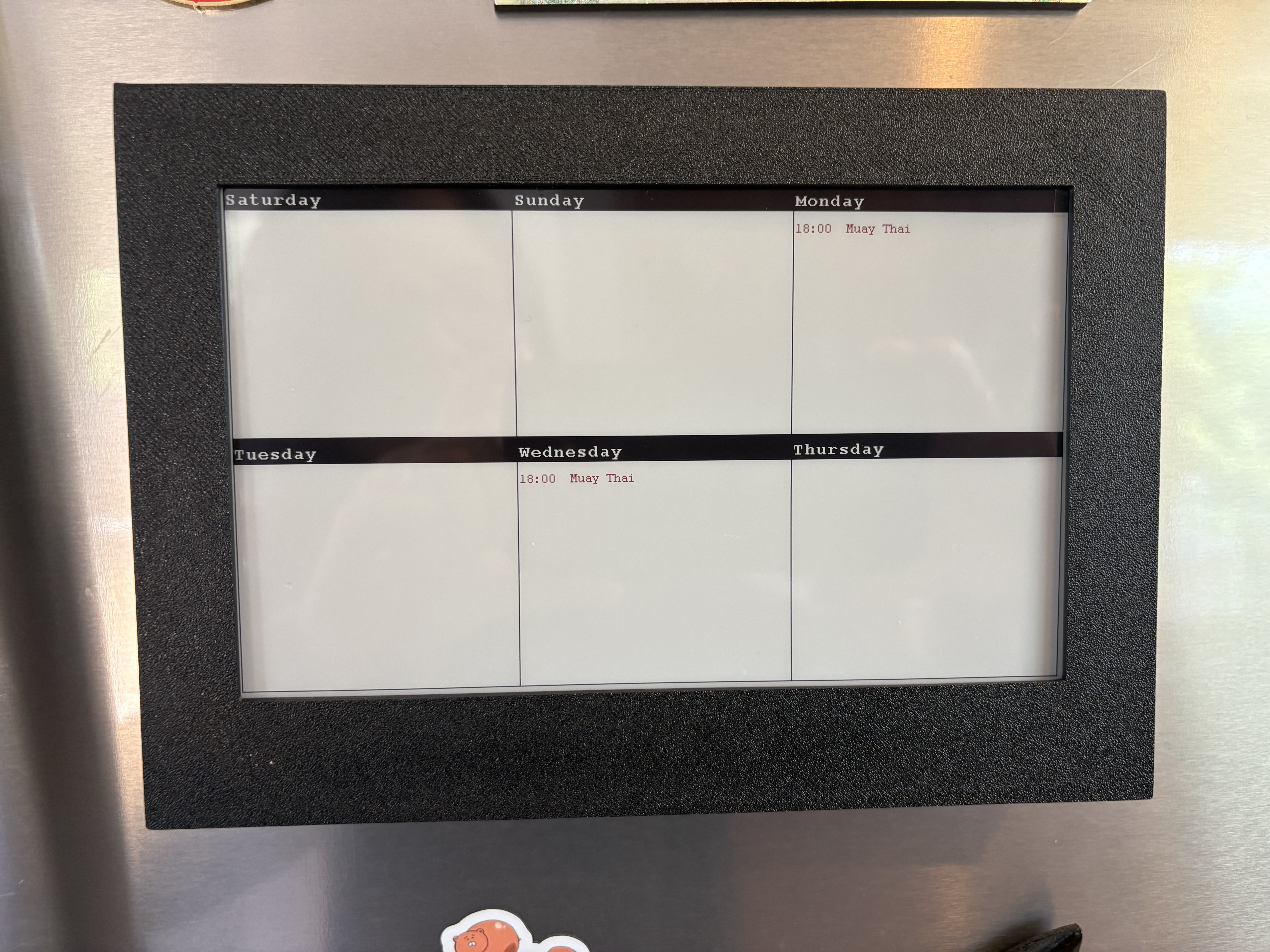
This is how the digital calendar looks like on our fridge and it’s been working well for us so far.
There is potentially room for expansion - ideas include but are not limited to:
- Adding a solar panel to charge the battery automatically
- Adding buttons to scroll through calendar beyond the first week
- Adding a month view to see events on a monthly basis instead of a weekly basis